I Left Ravelry and Track My Projects in a Spreadsheet Now
In June 2020, Ravelry launched a site redesign that gave people migraines. Not figuratively. Users reported seizures, vestibular episodes and vision problems within minutes of loading the new interface. The community backlash was massive. Thousands of knitters and crocheters who had used the site for over a decade suddenly couldn't access their own project data without getting physically sick.
Ravelry eventually added a "classic" mode, but the trust was broken. People started looking for alternatives. I was one of them — and when I couldn't find what I wanted, I built CraftFlux to handle it myself.
What Ravelry actually does well
I want to be fair. Ravelry has an incredible pattern database. Over a million free and paid patterns, searchable by yarn weight, needle size, technique, garment type. The yarn database is similarly deep. And the forums are active communities where people have been helping each other with dropped stitches and gauge issues since 2007.
For finding a pattern for a cabled hat using worsted weight yarn, nothing beats Ravelry. I still use it for that.
But pattern discovery and project tracking are two different things. And Ravelry is built around patterns, not projects.
The project tracking gap
Ravelry's project page is basically a list of things you've made, each one linked back to a pattern. You can add notes. You can upload photos. You can tag the yarn you used.
What you can't do:
- See how many hours you spent on a project
- Track how much you spent on materials across all your projects
- Get a chart showing your completion rate over time
- Compare difficulty levels across finished projects
- See which craft types eat most of your budget
- Track non-fiber crafts at all
Ravelry is pattern-centric. Everything revolves around "I made this pattern." But I wanted a project-centric view. How many WIPs do I have right now? What's my total spending this year? How long do my projects actually take?
That's where the spreadsheet came in.
What the spreadsheet tracks
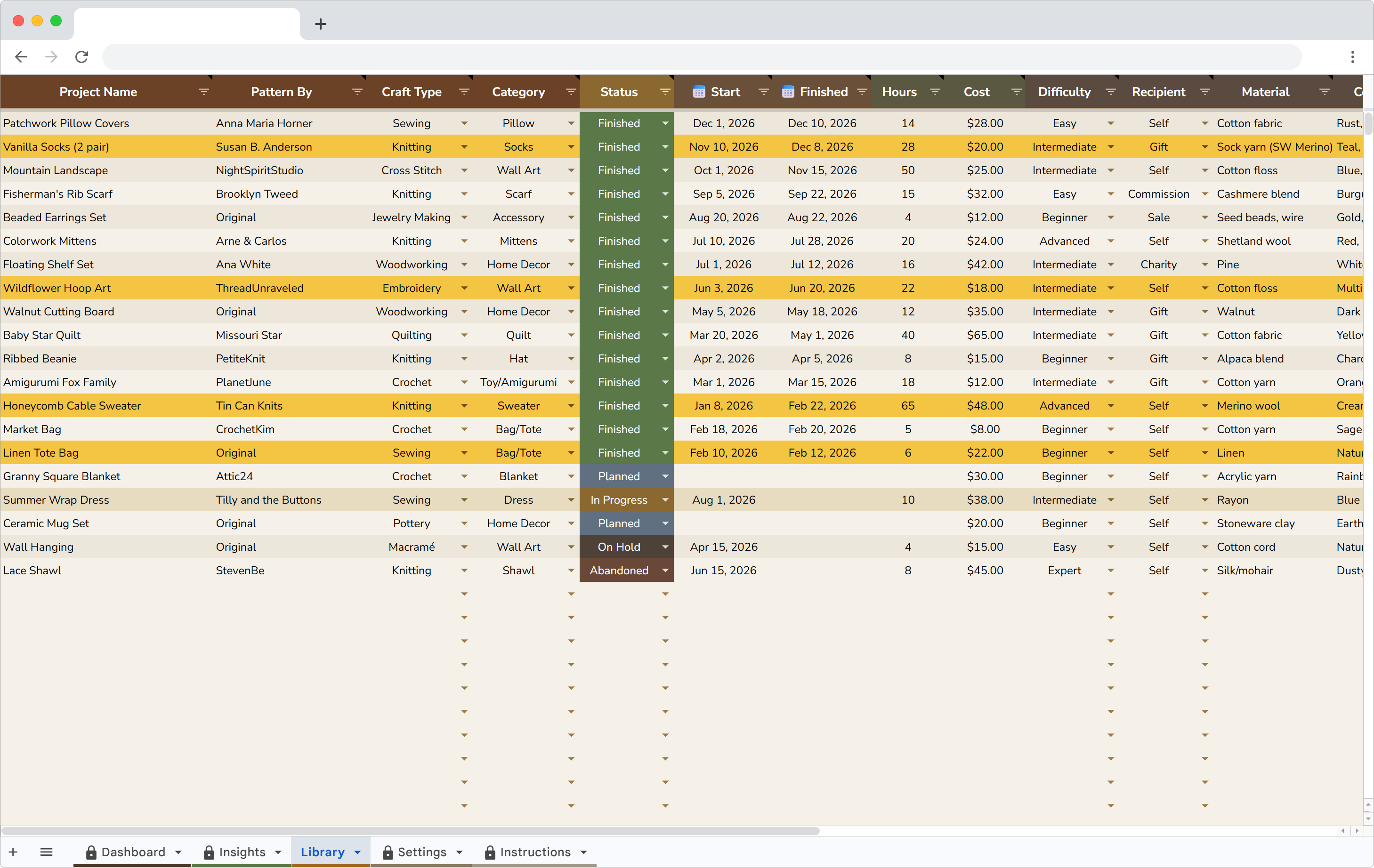
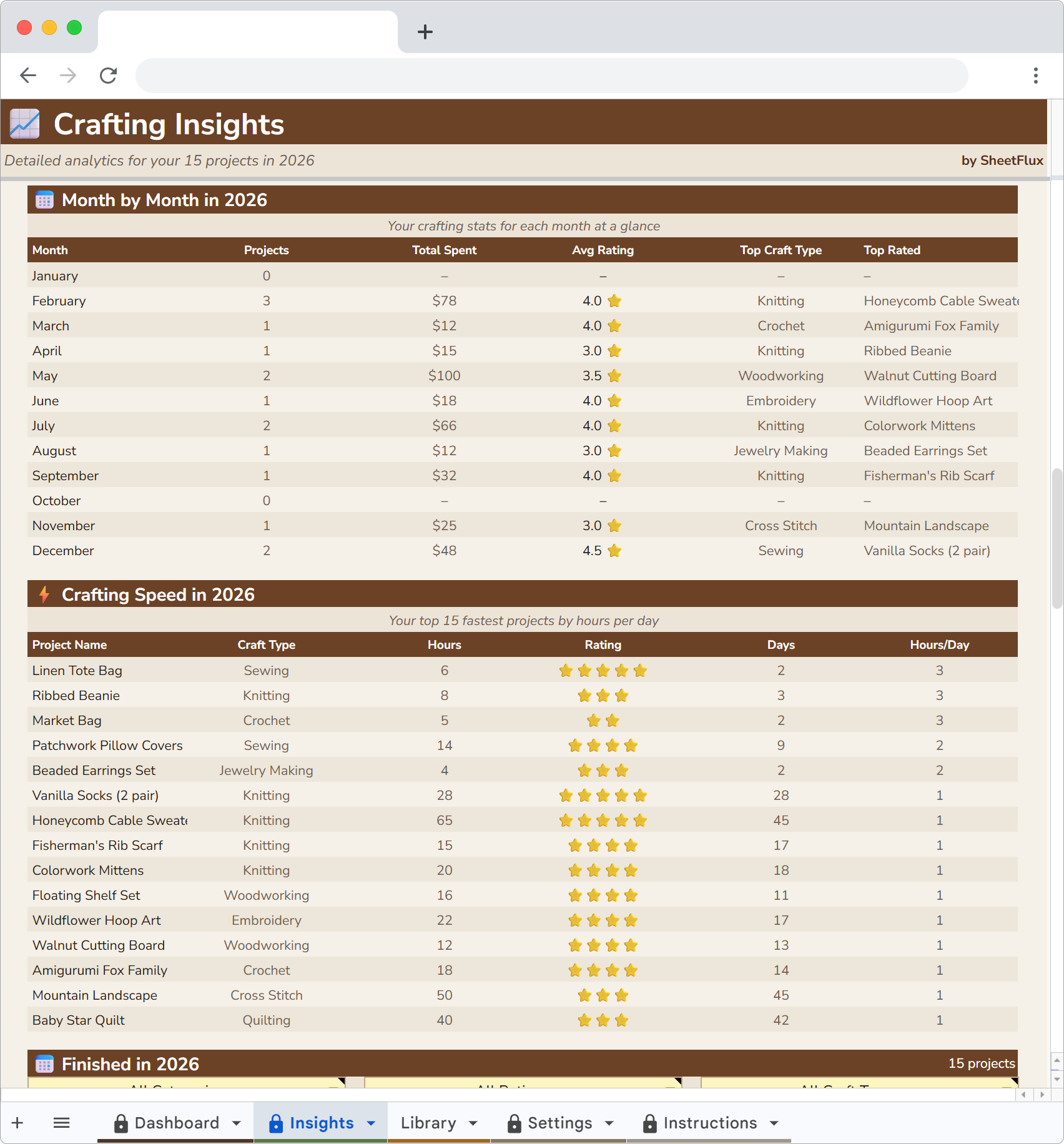
Each row is a project. The columns cover everything Ravelry tracks plus everything it doesn't:
- Project name and craft type – knitting, crochet, sewing, woodworking, ceramics, whatever
- Status – not started, in progress, finished, on hold, dropped
- Hours spent – the column Ravelry doesn't have
- Materials cost – yarn, fabric, wood, glaze, all of it
- Difficulty – beginner through expert, your own honest assessment
- Date started and date finished – project duration falls out of this automatically
- Recipient – for me, gift, commission
- Rating – how happy I am with the finished piece
Filling in a row takes 30 seconds. The dashboard and charts update on their own.
The WIP problem
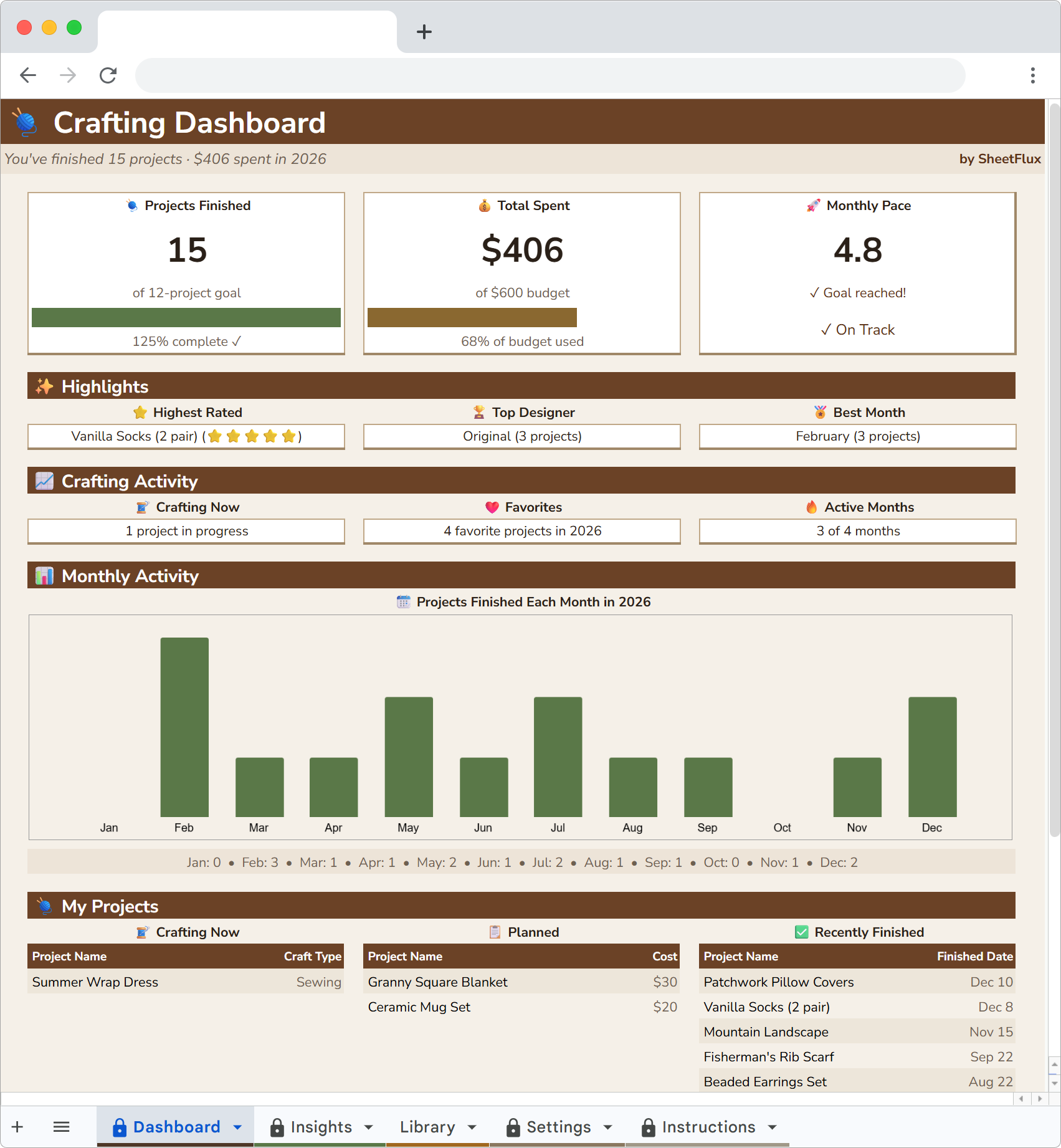
I had 8 unfinished projects when I started the spreadsheet. Eight. Two knitting projects, a quilt, a half-assembled bookshelf, some ceramic pieces waiting to be glazed and three smaller things I'd forgotten about entirely.
On Ravelry, those projects were scattered across different pages. Some I hadn't updated in months. There was no single view that said "here are all your unfinished things, ranked by how long they've been sitting there."
The spreadsheet puts them in a flat list. Sorted by date started. The oldest WIP stares at you every time you open it. That guilt is productive. I finished 4 of those 8 projects in the first month after setting up tracking, just because seeing them listed out made ignoring them harder.
Spending gets real fast
I spent $340 on craft materials last year. $190 of that went to projects I haven't started yet. That's yarn and fabric sitting in bins, waiting. More than half my spending was on things I haven't touched.
I did not know that before the spreadsheet. I bought yarn because it was pretty and on sale. Each purchase felt small. $18 here, $25 there. But $190 in unstarted materials is a number that changes your behavior. I stopped buying yarn on impulse after I saw that breakdown.
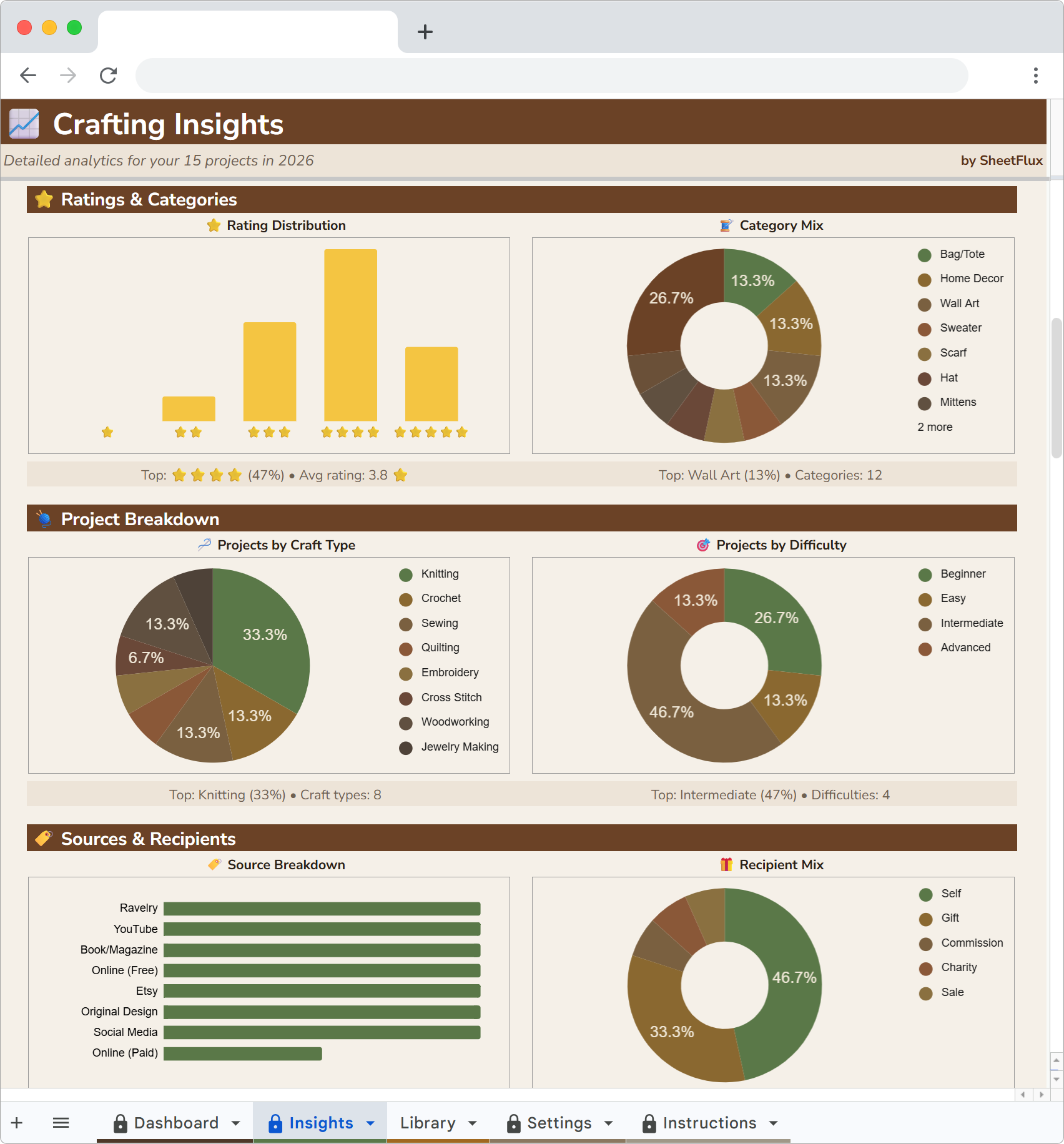
The spending data also showed me that knitting is my most expensive craft per project. Sewing is cheaper because I buy fabric on sale in bulk. Woodworking has higher upfront tool costs but the per-project material cost is lower than I expected.
Cross-craft tracking
This is the big one. Ravelry is fiber arts only. Knitting, crochet, spinning, weaving. If you also sew, or do woodworking, or throw pots, you need a separate system for those.
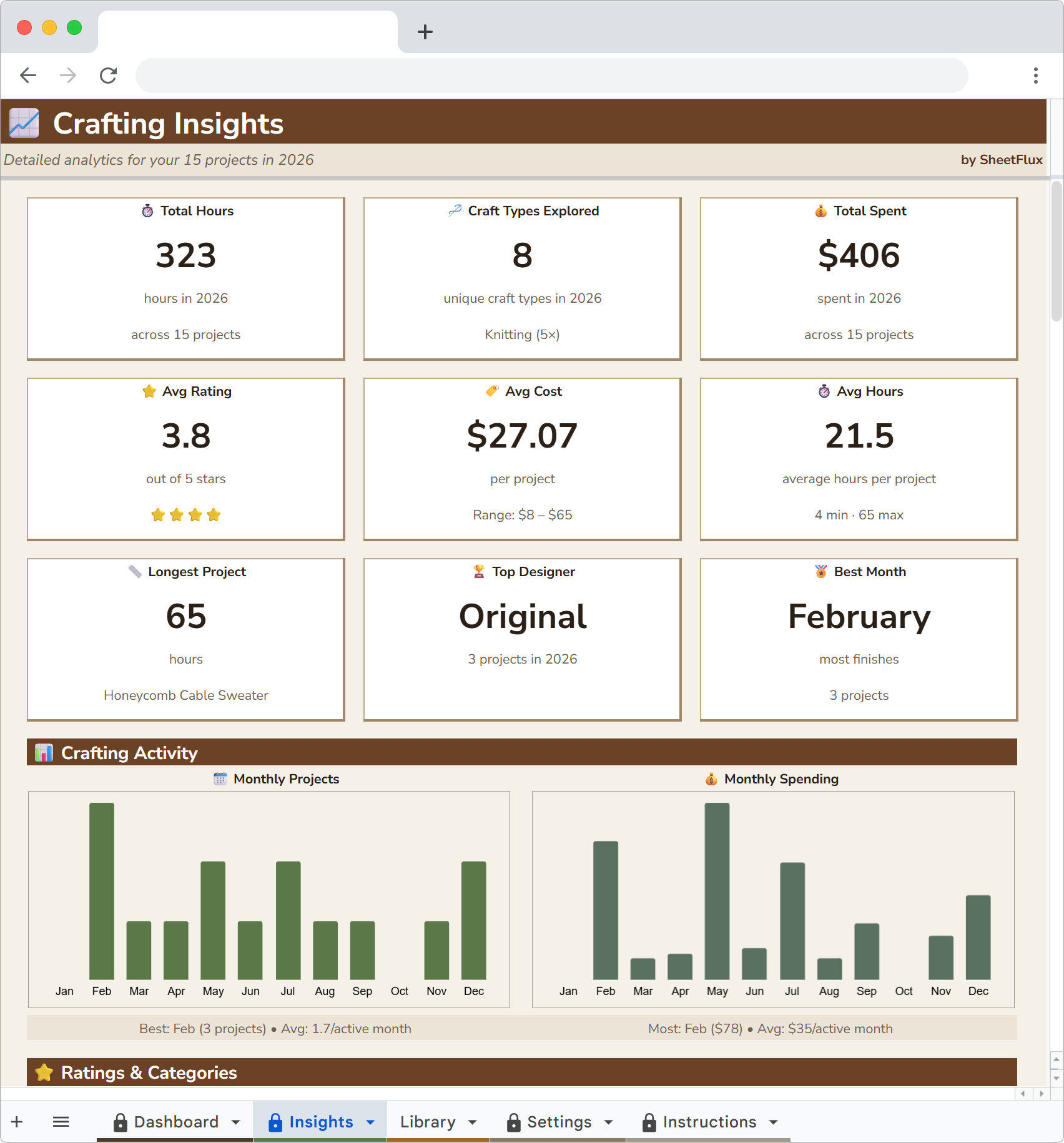
I do three different crafts regularly and dabble in two more. Having them all in one spreadsheet means I can see my total creative output for the year, not just my knitting output. I finished 23 projects last year across all crafts. On Ravelry, it looked like 11 because the other 12 were invisible.
The breakdown by craft type tells me where my time actually goes. Knitting gets the most hours but sewing produces the most finished projects because each one is faster. That's useful information when I'm deciding what to work on next.
Hours per project
A cabled sweater takes me about 45 hours. A simple hat takes 6. A quilt takes 15 to 20 depending on complexity.
I know these numbers because I tracked them. Before the spreadsheet, I had no idea how long anything took. I'd start a sweater in October thinking I'd have it done for Christmas. Forty-five hours at my actual pace means about 6 weeks of evening crafting. Christmas was never realistic.
Now I look at the hours data before committing to a gift project. If someone's birthday is in three weeks, they're getting a hat, not a sweater.
The Ravelry + spreadsheet combo
I didn't delete my Ravelry account. I still use it to browse patterns, read project notes from other makers and check yarn substitution suggestions. Ravelry is great at connecting you with patterns and people.
But the moment I cast on or cut fabric, that project goes in the spreadsheet. Ravelry tells me what to make. The spreadsheet tells me how I'm doing.
The two tools do different jobs. Trying to make Ravelry do project analytics is like trying to make Instagram do accounting. It was built for something else.
Track your craft projects
CraftFlux is a Google Sheets project tracker for knitting, sewing, woodworking and more. Hours, spending, difficulty and progress charts. 20 sample projects included.
More articles
- Why I Ditched Goodreads for a Spreadsheet
- Letterboxd Is Great but It Can't Do This
- I Replaced My Gaming Backlog App with a Spreadsheet
- Why I Quit Untappd and Track Beer in Google Sheets
- Why I Started Logging Every Drawing I Make
- How I Finally Started Finishing Craft Projects
- How I Track My Comic Collection Without Losing My Mind
- How I Track Every Movie and Show I Watch
- I Tracked Every Book I Read for a Year
- How I Track My Online Courses in Google Sheets
- How to Track Every Concert You Go To
- Why I Track Every Album I Listen To
- How I Finally Got My Gaming Backlog Under Control
- How I Track Everything I Watch, Read and Play in Google Sheets
- Google Sheets vs Notion for Tracking Hobbies
- How to Build a Year-in-Review Dashboard for Your Hobbies
- The Board Gamer's Guide to Tracking Cost Per Play
- Why I Stopped Using Vivino and Started Tracking Wine in a Spreadsheet